I’ve written many times about how ChatGPT has turned many things in my long pending wish lists to reality e.g. responsive design website, data miner, semantic search.
Let me add Explainer Video to that list.
I’ve been trying to make an explainer video for my company for a while. The best-in-class video production agencies in the world (e.g. Sandwich) were way above our paygrade. The affordable ones sucked – not only were their portfolios sloppy but their sales and delivery skills sucked e.g. poor communication, inability to understand our requirements, repeated slippage of milestones, and so forth.
As a result, I put the initiative on the backburner.
That changed when I recently heard about Pictory.ai, a new age genAI video maker. Pictory bills itself as the easiest way to create professional videos using the power of AI. Going by its promise to work without any video editing skills, it seemed exactly what I needed.
I immediately registered on its website and uploaded my company’s corporate overview presentation.
Pictory created a storyboard with voiceover within seconds. (It took me weeks to reach this stage with the couple of video agencies that I’d tried in the past).
Once I clicked the preview button, I got the first version of the explainer video within a few minutes, complete with audio and video.
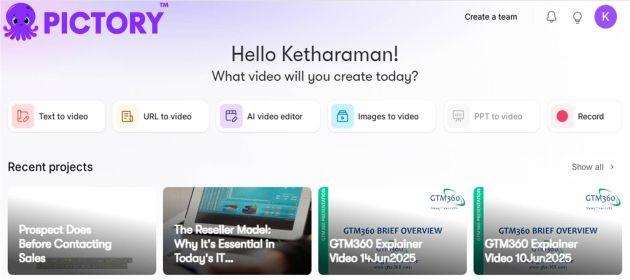
I was thinking of using my own voice for the audio. Pictory’s Pro plan ($50/mo.) supports both custom voices and premium voices from Eleven Labs, the world’s foremost AI voice provider. I signed up for this plan and recorded the script in my voice. I got the next version of the video within a few minutes.
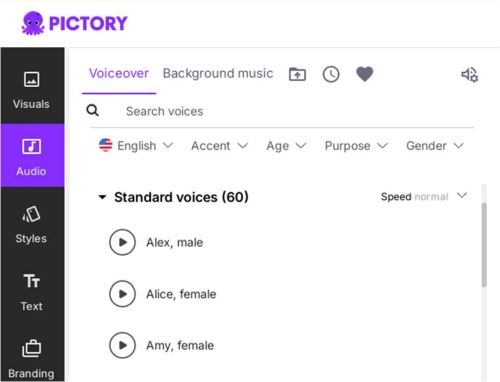 I then edited the audio and tried to sync it with the video. Unfortunately, Pictory does not support autosync of custom voices. Manual synching was too cumbersome, so I ditched my voice and selected one of the premium voices in Pictory’s Eleven Labs collection. Pictory created the preview with the premium voice in a couple of minutes.
After I made the required changes in the script, Pictory automatically synchronized the voice. I previewed the video. It looked good but it had black bands on either side of the frame. I asked the genAI chatbot on the website (more on that in a bit) about these bands. It told me that they were created by the force fitting of my slide deck’s native 5:4 aspect ratio into Pictory’s default 16:9 container.
I then looked for a way to crop out the black bands and asked ChatGPT for guidance. Chat referred me to a Microsoft AI video maker called ClipChamp. (The Pictory chatbot faltered here probably because it didn’t want to refer me to its competitor).
I was able to use this website to crop out the black bands but it took several hours – yes, hours – for ClipChamp to create the revised video. While that was okay for one-off changes, it was not workable for repeated edits.
So I created another version of my slide deck with Pictory’s standard aspect ratio. I then opened another project on Pictory with the 16:9 format, and repeated the process.
Presto! I got the final version of the explainer video within minutes. Check it out!
The end-to-end process took me four hours spread over a week.
genAI thusly quenched my long pending thirst for an explainer video.
I still had many days left on my Pro plan, so I decided to check out some of the features of Pictory that I’d not used while creating the above explainer video. In the process, I created video adaptations of some of my blog posts:
 |
 |
|---|---|
| What Prospect Does Before Contacting Sales | The Reseller Model: Why It’s Essential in Today’s IT Landscape |
For these videos, I accepted the default scenes and voiceovers created by Pictory. In other words, they’re 100% created by AI without man-in-the-loop.
Let me take this opportunity to make a few observations about the Pictory.ai platform:
- I liked it that the platform supports both man-in-the-loop and man-out-of-the-loop. The former mode is useful for high quality videos whether the latter mode is good enough for quick-and-dirty videos.
- The genAI chatbot on the website provides an excellent walk through of the features supported by the platform and answers questions in natural language. It worked quite accurately and without any hallucination. (However, unlike ChatGPT, it did not offer any follow-on guidance.) On a side note, once all SaaS websites feature a similar genAI chatbot, it will make it a breeze for users to navigate their features. I’m happy to note that genAI has fulfilled some of the wishes I’d expressed in my blog posts AI In UI and AI In UX.
- The website is very sluggish. If you want to change the voiceover for a scene, you need to click the scene and make sure to see the link established between the voiceover and the scene before you edit the voiceover, otherwise, the voiceover may apply to some other scene!
- Ditto for link creation. When I first collected the links for the videos of the above two blog posts, I got the same URL for both! I’d to return to the website after a few minutes to get the correct link for the second video.
I’d give Pictory.ai a 3 out of 5 stars rating for UI and UX. However, as a technology solution that alleviates a chronic business pain area, Pictory gets 10 out of 5 stars on CX. Accordingly, I’d add Pictory.ai to the Bad UX but Good CX category of applications that I covered in my blog post on CX v. UX, which includes IRCTC among others.